SPF check (Sender Policy Framework)
SPF declares which servers can send email for your domain. Bad SPF setup increases spoofing risk and can weaken deliverability when paired with weak DKIM or DMARC alignment.
- Free scan to confirm whether the record exists, is duplicated, or is close to the 10-lookup SPF limit.
- Paid report when you need a prioritized plan instead of guessing which include or sender to keep.
If you want to test a domain live, the scan stays on the homepage. This page is here to explain what SPF problems usually mean in practice.
What the SPF report looks like
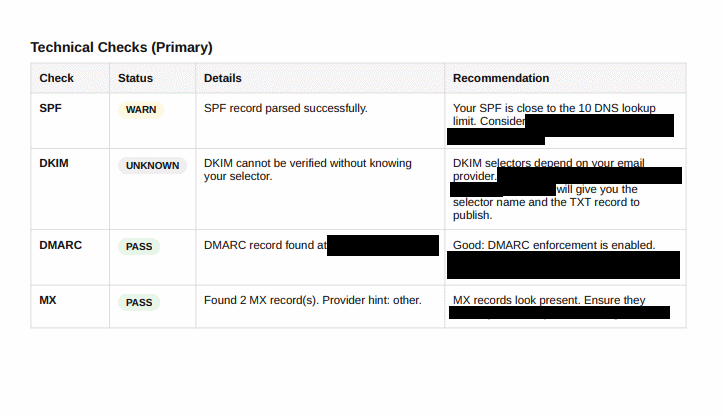
That matters because SPF is often not “missing”, it is just messy: too many includes, legacy senders, or conflicting records.
- The free scan surfaces the issue.
- The PDF explains what to keep, what to remove and what sequence is safer.
- That is the difference between a diagnostic and an actionable deliverability task.
Common SPF failures
No SPF record
Receiving servers cannot validate your sending sources.
Too many DNS lookups
SPF has a maximum of 10 lookups. Check the full include chain and its PermError risk.
SPF PermError
Multiple records, excessive lookups or invalid syntax can prevent SPF evaluation.
Weak policy ending
Choose ~all or -all based on your sender inventory confidence.
How SPF affects business email
Without a clean SPF setup
Teams accumulate old tools in DNS, hit lookup limits, and lose confidence about which platforms are allowed to send. That makes every DNS edit feel risky.
With a clear SPF action plan
You can simplify the record, keep only legitimate senders, reduce spoofing surface and support stronger DMARC decisions later.
FAQ
Yes. It helps block spoofing and supports DMARC.
No. DKIM, DMARC alignment, sender reputation and content still matter.