Why are my emails going to spam?
Start with the fundamentals: SPF, DKIM, DMARC and alignment. Then move to reputation and content hygiene.
- This page is for diagnosis, not guesswork: authenticate first, then look at sender reputation and list quality.
- The report is useful when several factors interact and you need an ordered action plan.
Use this page as a diagnosis guide. The live scan remains on the homepage so the learning pages can stay lighter and easier to read.
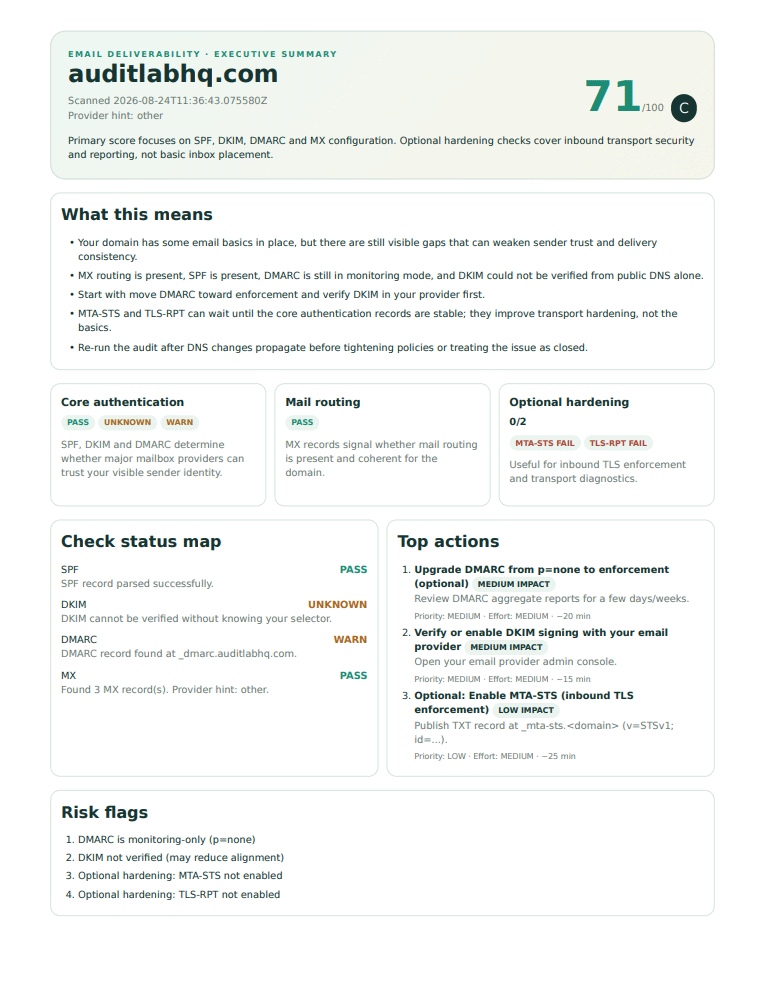
What buyers understand faster with a report
“Going to spam” is not a single bug. It is usually a stack of weak signals: authentication gaps, alignment issues, list quality, engagement or sender reputation.
- The scan surfaces technical signals you can verify quickly.
- The PDF gives a concise explanation of what looks urgent versus what is secondary.
- That makes it easier to decide whether to fix DNS, sender setup or campaign hygiene first.
Top causes of spam placement
Missing SPF, DKIM or DMARC
Without authentication, mailbox providers trust your messages less.
Alignment failures
DMARC requires SPF or DKIM to align with your visible From domain.
Poor list hygiene
Inactive or unverified contacts increase bounce and complaint risk.
Weak sender reputation
Domain and IP history strongly influence inbox placement.
What this page can and cannot diagnose
What it can help with fast
SPF, DKIM, DMARC, MX, MTA-STS and TLS-RPT issues that are visible through DNS and mail policy signals.
What still needs broader analysis
Engagement, campaign content, complaint rate, bounce handling and sender reputation trends across providers.
FAQ
It is necessary but not sufficient. Reputation and content still matter.
No. It evaluates email authentication and DNS hardening signals.